Generate SRT from Word Timestamps in Python
By Yana Li · July 24, 2026 · 13 min read
Convert generic speech-to-text word timestamps into readable SRT subtitles with tested Python, JSON input, segmentation rules, and validation checks.
To generate SRT from word timestamps in Python, you need to do more than reformat the clock values. Word-level timestamps are evidence about when individual tokens occurred; an SRT file needs readable text cues with ordered start and end times. The practical job is to validate the words, group them at sensible boundaries, wrap the text, and then serialize the result.
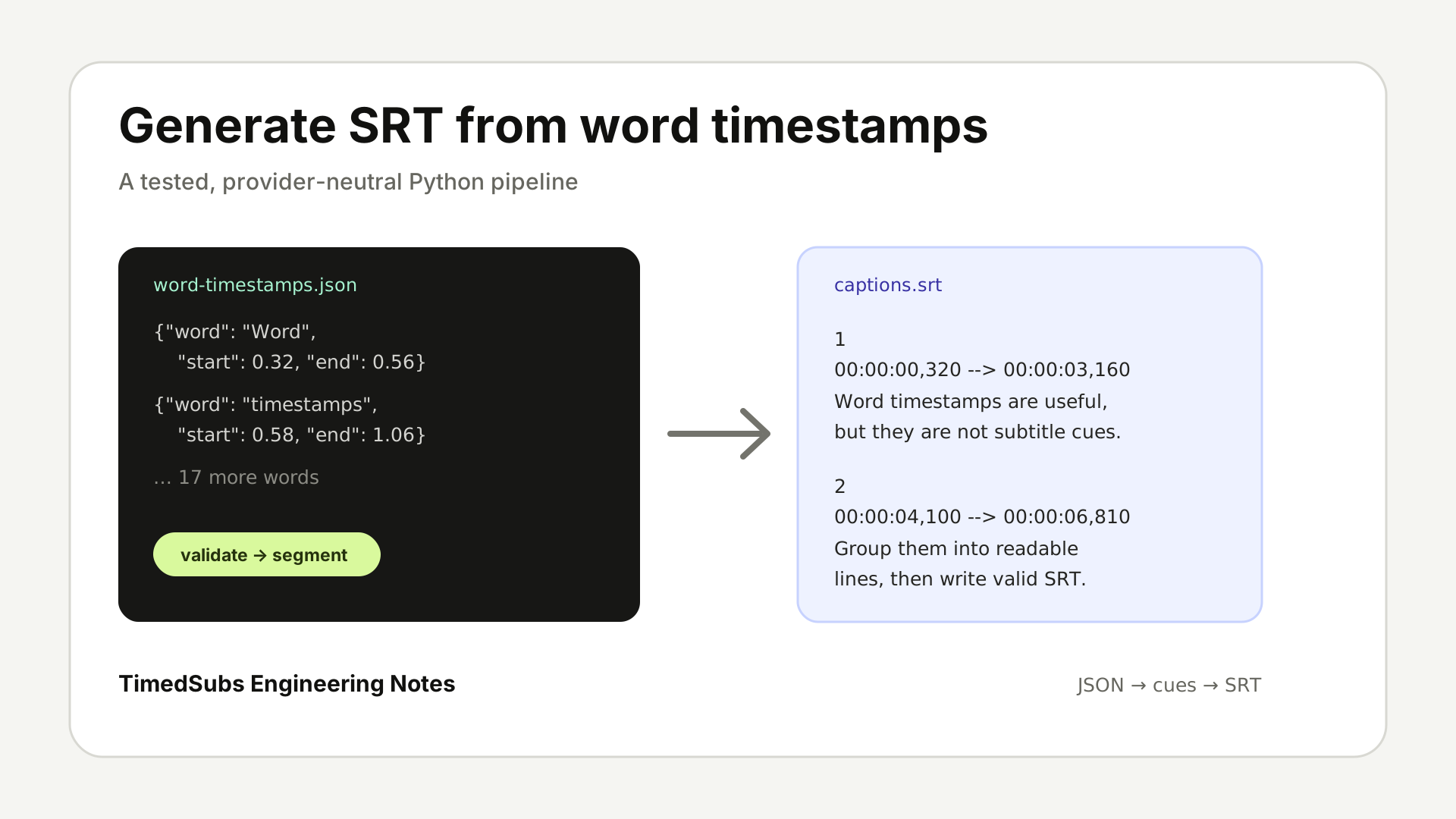
This guide gives you that complete path with no provider SDK and no third-party Python package. You can download the Python program, use the checked JSON fixture, and reproduce the exact SRT shown below.
Word timestamps are not subtitle cues
A speech-to-text API or alignment system may return one start and end time per word. That is useful input, but displaying every word as a separate subtitle would flicker, while placing the whole transcript in one cue would be unreadable.
A delivery-ready cue needs at least five decisions that the raw stream does not contain:
- where a phrase begins and ends;
- when a silence gap should force a new cue;
- how long one cue may remain on screen;
- how much text fits on one or two lines;
- whether every timestamp is valid, ordered, and non-overlapping.
The converter below makes those decisions explicitly. That matters because you can inspect and change a heuristic instead of inheriting an undocumented provider default.
The generic JSON input contract
The example accepts a non-empty JSON array. Each item has a word, a start time, and an end time measured in seconds from the beginning of the media:
[
  {"word": "Word", "start": 0.32, "end": 0.56},
  {"word": "timestamps", "start": 0.58, "end": 1.06},
  {"word": "are", "start": 1.09, "end": 1.25}
]
The shape is deliberately small and provider-neutral. This dependency-free example expects normalized, directly displayable, whitespace-delimited word tokens. If your speech-to-text JSON uses text, milliseconds, nested alternatives, or separate punctuation tokens, normalize it to this contract first. Do not hide that adapter inside the cue builder: acquisition formats change, while the subtitle rules should remain testable.
The input must already be in playback order. Every start and end must be a finite number, start must be non-negative, and the two values must still produce a positive duration after conversion to integer milliseconds. The script rejects overlapping words on that same output timeline rather than silently moving them because a silent correction would make the resulting timing look more trustworthy than its source.
CJK, Thai, and character-level timestamp streams need language-aware token joining, segmentation, and display-width handling before they enter this example. Raw character count is not a substitute for those rules, so this article does not claim to handle those streams safely.
When you generate SRT from word timestamps in Python, this small normalized boundary keeps provider-specific parsing separate from subtitle behavior.
How to generate SRT from word timestamps in Python
Save the following as word-timestamps-to-srt.py, or download the same checked source file. It uses only the Python standard library.
#!/usr/bin/env python3
"""Convert whitespace-delimited word timestamps in JSON to readable SRT cues."""

from __future__ import annotations

import argparse
import json
import math
import sys
from pathlib import Path
from typing import TypedDict


class WordTimestamp(TypedDict):
    word: str
    start_ms: int
    end_ms: int


class Cue(TypedDict):
    text: str
    start_ms: int
    end_ms: int


TERMINAL_PUNCTUATION = (".", "!", "?")
CLOSING_PUNCTUATION = set(",.!?;:%)]}")


def seconds_to_milliseconds(seconds: float) -> int:
    return int(seconds * 1000 + 0.5)


def read_word_timestamps(path: Path) -> list[WordTimestamp]:
    raw = json.loads(path.read_text(encoding="utf-8"))
    if not isinstance(raw, list) or not raw:
        raise ValueError("input must be a non-empty JSON array")

    words: list[WordTimestamp] = []
    previous_start_ms = -1
    previous_end_ms = -1
    previous_end_seconds = -1.0

    for index, item in enumerate(raw):
        if not isinstance(item, dict):
            raise ValueError(f"word[{index}] must be an object; got {item!r}")

        word = item.get("word")
        start = item.get("start")
        end = item.get("end")

        if not isinstance(word, str) or not word.strip():
            raise ValueError(f"word[{index}].word must be a non-empty string; got {word!r}")
        if "\n" in word or "\r" in word:
            raise ValueError(f"word[{index}].word must stay on one line; got {word!r}")

        for field, value in (("start", start), ("end", end)):
            if isinstance(value, bool) or not isinstance(value, (int, float)) or not math.isfinite(value):
                raise ValueError(f"word[{index}].{field} must be a finite number; got {value!r}")

        start_seconds = float(start)
        end_seconds = float(end)
        if start_seconds < 0:
            raise ValueError(f"word[{index}].start must be non-negative; got {start!r}")
        start_ms = seconds_to_milliseconds(start_seconds)
        end_ms = seconds_to_milliseconds(end_seconds)
        if end_ms <= start_ms:
            raise ValueError(
                f"word[{index}] must have positive duration after millisecond rounding; "
                f"start={start!r}, end={end!r}, "
                f"rounded_start_ms={start_ms}, rounded_end_ms={end_ms}"
            )
        if start_ms < previous_start_ms:
            raise ValueError(
                f"word[{index}] is unsorted after millisecond rounding; "
                f"start={start!r} ({start_ms}ms), previous_start_ms={previous_start_ms}"
            )
        if start_ms < previous_end_ms:
            raise ValueError(
                f"word[{index}] overlaps the previous word; "
                f"start={start!r} ({start_ms}ms), "
                f"previous_end={previous_end_seconds:g} ({previous_end_ms}ms)"
            )

        words.append({"word": word.strip(), "start_ms": start_ms, "end_ms": end_ms})
        previous_start_ms = start_ms
        previous_end_ms = end_ms
        previous_end_seconds = end_seconds

    return words


def join_tokens(tokens: list[str]) -> str:
    text = ""
    for token in tokens:
        if text and token[0] not in CLOSING_PUNCTUATION:
            text += " "
        text += token
    return text


def ends_sentence(token: str) -> bool:
    return token.rstrip("\"'”’)]}").endswith(TERMINAL_PUNCTUATION)


def split_into_cues(
    words: list[WordTimestamp],
    *,
    max_gap_ms: int = 800,
    max_duration_ms: int = 6000,
    max_chars_per_line: int = 42,
    max_lines: int = 2,
) -> list[list[WordTimestamp]]:
    if max_gap_ms <= 0 or max_duration_ms <= 0 or max_chars_per_line <= 0 or max_lines <= 0:
        raise ValueError("segmentation limits must all be positive")
    if max_lines != 2:
        raise ValueError("this example supports exactly two display lines per cue")

    for index, item in enumerate(words):
        if len(item["word"]) > max_chars_per_line:
            raise ValueError(
                f"word[{index}] exceeds max_chars_per_line={max_chars_per_line}; "
                f"word={item['word']!r}"
            )
        duration_ms = item["end_ms"] - item["start_ms"]
        if duration_ms > max_duration_ms:
            raise ValueError(
                f"word[{index}] lasts {duration_ms}ms and exceeds "
                f"max_duration_ms={max_duration_ms}ms"
            )

    cues: list[list[WordTimestamp]] = []
    current: list[WordTimestamp] = []

    for item in words:
        if current:
            previous = current[-1]
            projected_text = join_tokens([entry["word"] for entry in [*current, item]])
            try:
                wrap_cue_text(projected_text, max_chars_per_line, max_lines)
                projected_text_fits = True
            except ValueError:
                projected_text_fits = False
            starts_new_cue = (
                ends_sentence(previous["word"])
                or item["start_ms"] - previous["end_ms"] >= max_gap_ms
                or item["end_ms"] - current[0]["start_ms"] > max_duration_ms
                or not projected_text_fits
            )
            if starts_new_cue:
                cues.append(current)
                current = []

        current.append(item)

    if current:
        cues.append(current)

    return cues


def wrap_cue_text(text: str, max_chars_per_line: int = 42, max_lines: int = 2) -> str:
    if len(text) <= max_chars_per_line:
        return text
    if max_lines != 2:
        raise ValueError("this example supports exactly two display lines per cue")

    words = text.split()
    candidates: list[tuple[int, int, str, str]] = []
    for split_index in range(1, len(words)):
        first = " ".join(words[:split_index])
        second = " ".join(words[split_index:])
        if len(first) <= max_chars_per_line and len(second) <= max_chars_per_line:
            candidates.append((abs(len(first) - len(second)), max(len(first), len(second)), first, second))

    if not candidates:
        raise ValueError(
            f"cue cannot fit within {max_lines} lines of {max_chars_per_line} characters: {text!r}"
        )

    _, _, first_line, second_line = min(candidates)
    return f"{first_line}\n{second_line}"


def format_srt_timestamp(milliseconds: int) -> str:
    hours, remainder = divmod(milliseconds, 3_600_000)
    minutes, remainder = divmod(remainder, 60_000)
    whole_seconds, milliseconds = divmod(remainder, 1000)
    return f"{hours:02d}:{minutes:02d}:{whole_seconds:02d},{milliseconds:03d}"


def build_srt(words: list[WordTimestamp]) -> str:
    cue_words = split_into_cues(words)
    cues: list[Cue] = []

    for group in cue_words:
        text = join_tokens([item["word"] for item in group])
        cues.append(
            {
                "text": wrap_cue_text(text),
                "start_ms": group[0]["start_ms"],
                "end_ms": group[-1]["end_ms"],
            }
        )

    blocks = [
        "\n".join(
            [
                str(index),
                f"{format_srt_timestamp(cue['start_ms'])} --> "
                f"{format_srt_timestamp(cue['end_ms'])}",
                cue["text"],
            ]
        )
        for index, cue in enumerate(cues, start=1)
    ]
    return "\n\n".join(blocks) + "\n"


def parse_args() -> argparse.Namespace:
    parser = argparse.ArgumentParser(
        description=(
            "Convert normalized whitespace-delimited word/start/end objects into SRT."
        )
    )
    parser.add_argument("input", type=Path, help="path to the word-timestamp JSON file")
    parser.add_argument("-o", "--output", type=Path, help="optional SRT output path")
    return parser.parse_args()


def main() -> int:
    args = parse_args()
    try:
        srt = build_srt(read_word_timestamps(args.input))
        if args.output:
            args.output.write_text(srt, encoding="utf-8")
        else:
            print(srt, end="")
    except (OSError, json.JSONDecodeError, ValueError) as error:
        print(f"error: {error}", file=sys.stderr)
        return 2

    return 0


if __name__ == "__main__":
    raise SystemExit(main())
Put the JSON fixture beside it, then run:
python3 word-timestamps-to-srt.py word-timestamps.json > captions.srtUse -o captions.srt instead if you prefer the script to write the file directly.
How the cue segmentation rules work
To generate SRT from word timestamps in Python without creating a wall of text, you need explicit segmentation rules. SRT defines the cue container, not the editorial decisions that make cue text comfortable to read. The defaults below are transparent heuristics for this example, not universal requirements.
| Rule | Example default | What it prevents | Tradeoff |
|---|---|---|---|
| Sentence-ending punctuation | . ! ? | Two complete sentences becoming one cue | Poorly punctuated input will not trigger it |
| Silence gap | 0.8 seconds | A cue spanning a meaningful pause | Conversational hesitations may create more cues |
| Maximum cue duration | 6.0 seconds | A long cue lingering through too much speech | Fast speech may need a lower text limit too |
| Maximum text capacity | 42 characters × 2 lines | Dense blocks covering the picture | Other scripts and layouts need their own rules |
| Input overlap rejection | zero tolerance | Output that hides contradictory source timing | You must repair or regenerate bad source data |
Split before a meaningful silence gap
If the next word begins at least 0.8 seconds after the previous word ends, the script closes the current cue before adding the next word. The cue keeps the first word's start time and the final word's end time; it does not stretch across the pause.
The right threshold depends on your material. A lecture with deliberate pauses may need a higher value. A fast social clip may need a lower one. Treat it as a segmentation control, not a measurement of timestamp accuracy.
Prefer sentence-ending punctuation
The script starts a new cue after ., !, or ?. Commas do not force a split because that would create short fragments whenever the transcript contains a list. Detached Western closing punctuation is joined to the previous token before wrapping.
Punctuation is helpful but not sufficient. Some speech-to-text output has weak or missing punctuation, so duration and text-capacity limits must still stop one enormous cue.
Cap duration and text capacity
Before adding a word, the algorithm checks the projected cue duration and runs the same two-line wrapping rule used for final output. If either contract would fail, the current cue closes and the word starts the next one. A single token longer than six seconds or longer than one display line fails fast instead of bypassing the limit.
The 42-character, two-line default is a working Latin-script example. It is not encoded in the SRT format, and it is not right for every language, font, player, or video layout. For production, test the actual rendered subtitles and tune the values for the target platform.
When two lines are needed, wrap_cue_text evaluates every legal word boundary and chooses the most balanced pair that stays within the limit. It never breaks a word. A single token longer than the configured line limit fails fast because silently slicing an identifier or URL would alter the delivered text.
Keep cue times ordered and non-overlapping
The converter does not invent new timing. It converts input seconds once with round-half-up and then uses integer milliseconds for validation, grouping, and output. A cue starts at its first word and ends at its final word. Because the input validator rejects zero-duration, unsorted, and overlapping words on that output timeline, the grouped cues remain ordered and non-overlapping.
That is intentionally conservative. If an upstream API returns contradictory offsets, fix the adapter or regenerate the timestamps. Do not make the serialization step silently move words and call the result precise.
Exact input and deterministic SRT output
Once you generate SRT from word timestamps in Python with the committed fixture, the program produces exactly:
1
00:00:00,320 --> 00:00:03,160
Word timestamps are useful,
but they are not subtitle cues.

2
00:00:04,100 --> 00:00:06,810
Group them into readable
lines, then write valid SRT.
This output demonstrates the structural job: sequential cue numbers, comma-millisecond timestamps, positive durations, a blank line between cues, balanced line breaks, and no overlap.
The repository test executes the downloadable Python file against the downloadable JSON, compares the entire output byte for byte, parses it again using TimedSubs' SRT parser, and checks duration, order, overlap, and line length. That verifies the example. It does not prove that a synthetic fixture matches real speech or that one set of segmentation defaults is ideal for every video.
Failure cases the script rejects
If you generate SRT from word timestamps in Python, failing early is better than exporting a plausible-looking subtitle file from bad evidence.
- A missing token or timestamp. Every item needs a non-empty
word,start, andend. - A non-finite or negative time. Booleans, strings,
NaN, infinity, and negative starts are invalid. - Zero or negative output duration. A word must still end after it starts once both values are rounded to milliseconds.
- Unsorted words. If a later item starts earlier than the previous item, the input is not in playback order.
- Overlapping words. The program reports the item index, its start value, and the previous end value instead of hiding the conflict.
- A token that cannot fit. One token longer than the line limit or six-second duration limit requires an explicit policy; this example refuses to alter it.
- A projected cue that cannot wrap. The current cue closes before adding a token that would leave no legal two-line split.
- No punctuation. The duration and text-capacity fallbacks still create cues, but their boundaries may be less natural. That is a reason to review the result, not a reason to remove the limits.
There is one failure the converter cannot detect from timestamps alone: wrong words. If speech recognition returns “time subs” but your approved script says “TimedSubs,” clean segmentation will preserve the wrong transcript cleanly. When the final wording already exists, the better starting method is often alignment rather than transcription.
Validate the SRT before delivery
After you generate SRT from word timestamps in Python, check the asset before you upload or ship it:
- cue numbers start at 1 and stay sequential;
- each timing line uses
HH:MM:SS,mmm --> HH:MM:SS,mmm; - every cue ends after it starts;
- cue start times are ordered;
- adjacent cues do not overlap;
- cue text is not empty;
- lines fit the limits you chose;
- the file opens in the destination editor or player;
- the subtitles are readable against the actual picture at normal playback speed.
For the container details, see the SRT file structure. You can also check the finished subtitle file in the browser before delivery. Syntax checks cannot judge every editorial break, so review the rendered video as well.
Choose transcription, alignment, or a managed workflow
The method used to generate SRT from word timestamps in Python is only as trustworthy as the words and offsets you begin with.
Use speech-to-text when the spoken words do not exist as text yet. The recognizer gives you both a transcript and timing evidence, which you can normalize into this JSON contract.
Use alignment when the wording is already approved. In that workflow, the script remains the source of truth and audio is used to locate the words in time. The forced-alignment guide explains why that distinction matters when exact wording, names, or punctuation must survive.
Use a managed subtitle workflow when the job also needs uploads, background processing, cue QA, review, and multiple exports. TimedSubs can turn a script and matching audio into subtitles on one working page. If you only need the general file-building steps rather than code, start with the guide to create an SRT file from text.
These are different input situations, not competing accuracy claims. The correct choice depends on whether the words are unknown, approved, or already packaged as a subtitle asset.
Sources and methodology
The Library of Congress SRT format description documents the sequential counter, start/end timing line, comma-millisecond timecode, text, and blank-line structure used here. TimedSubs defines the normalized JSON input contract for this reproducible example; it is not presented as an industry-standard response shape.
The conversion code, JSON fixture, output, and tests are owned and checked in the TimedSubs repository. The 0.8-second gap, 6-second duration, 42-character line, and two-line capacity are demonstration defaults. They are adjustable segmentation heuristics, not universal SRT requirements or claims about provider accuracy.
python · srt · word timestamps · speech-to-text
Keep reading
- My First Paying Customer Failed 4 Times: Quality Is Not a Final CheckA quality gate worked exactly as designed — yet my first paying customer still failed 4 times. Quality is not the final check; it is product definition.
- One show in five languages: subtitle lessonsFive language versions, five narrations, five subtitle files per episode. The practical lessons on timing, line rules, and review that only volume teaches.
- Pay-as-you-go subtitle timing, no subscriptionBuy one, two, or three 60-minute subtitle timing packs in a single checkout. No auto-renewal, no expiry, and the same quality checks a plan gets.